
GateForge
Migrate from 3scale to Connectivity Link with zero risk.
Automated, AI-powered, and fully reversible.
Red Hat 3scale
→
GateForge
→
Connectivity Link
v0.1.9





Migrate from 3scale to Connectivity Link with zero risk.
Automated, AI-powered, and fully reversible.
Organizations running Red Hat 3scale API Management need a clear, automated path to Kubernetes-native API management via Red Hat Connectivity Link (Kuadrant). GateForge automates this migration end-to-end.
Translates 3scale Products, mapping rules, application plans, and credentials into Connectivity Link 1.3 resources: HTTPRoute, AuthPolicy, PlanPolicy, APIProduct, Secrets, and more. See Policy Mapping for full detail.
Discovers Products, Backends, Mapping Rules, and ActiveDocs via both CRD inspection and Admin API. Supports connecting to multiple 3scale instances simultaneously. Refresh discovery bypasses cache on demand.
LangChain4j-based AI agent generates equivalent Connectivity Link resources, then reviews correctness, identifies potential issues, and provides recommendations.
Apply migrations to any target OpenShift cluster with ArgoCD auto-discovery and per-cluster RBAC validation. Download YAML for GitOps workflows.
One-click revert of individual plans or bulk revert to restore 3scale management. Full audit trail with before/after YAML snapshots for every operation.
Discovers APIManager CRDs cluster-wide to find self-managed and multi-tenant APICast instances. Analyzes staging/production specs, custom Lua policies, TLS, and OpenTracing configuration. Maps APICast to Istio Gateway, EnvoyFilter, DestinationRule, and TelemetryPolicy.
PostgreSQL-backed persistence with Flyway migrations. Federated audit log across clusters. Hub overview API with aggregated stats and topology graph.
Packaged as a Helm chart on Artifact Hub. Deploys backend, frontend, and PostgreSQL with least-privilege RBAC. ArgoCD-native with selfHeal support.
Auto-discovers 3scale products. Generates Component entities with providesApis. Dynamic plugin with Observability, Topology, and Editor tabs.
Generates HTTPRoute, AuthPolicy, and RateLimitPolicy from OpenAPI specs. Auto-consolidates rules exceeding the Gateway API 16-rule limit into prefix-based matches.
Generates APIProduct, PlanPolicy, and APIKey CRDs from 3scale Application Plans, credentials, and product metadata.
Common AI questions cached in Red Hat Data Grid for instant responses. Observability via OpenTelemetry, Prometheus, and Grafana.
GateForge has been tested with the following Red Hat product versions:
| Product | Version | Status |
|---|---|---|
| OpenShift Container Platform | 4.20, 4.21 | Tested |
| Red Hat Connectivity Link | 1.2, 1.3 | Tested |
| Kuadrant (upstream) | 1.1.x (bundled with Connectivity Link) | Tested |
| Red Hat 3scale API Management | 2.16.x (2.16.2, 2.16.3) | Tested |
| Red Hat Build of Keycloak (RHBK) | 26.4.x | Tested |
| Istio (Sail Operator / Service Mesh 3.x) | 3.x | Tested |
| PostgreSQL (RHEL 9) | 15.x | Tested |
| Flyway (Quarkus Extension) | 10.x (via Quarkus BOM) | Tested |
| Gateway API | v1.2.x (bundled with OpenShift) | Compatible |
| Microcks | 1.10.x | Compatible |
| Red Hat Data Grid (Infinispan) | 15.x (Hot Rod protocol) | Tested |
| Red Hat Developer Hub | 1.9.x | Tested |
| 3scale Plugin for Developer Hub | 3.10.x (backstage-community-plugin-3scale-backend) | Tested |
| kuadrantctl | 0.10.x | Tested |
| GateForge DevHub Plugin | 0.1.9 (quay.io/maximilianopizarro/gateforge-devhub-plugin) | Tested |
| OpenTelemetry Operator | 0.x (Collector + Instrumentation) | Compatible |
| Grafana Operator | 5.x | Compatible |
Click any image to enlarge.
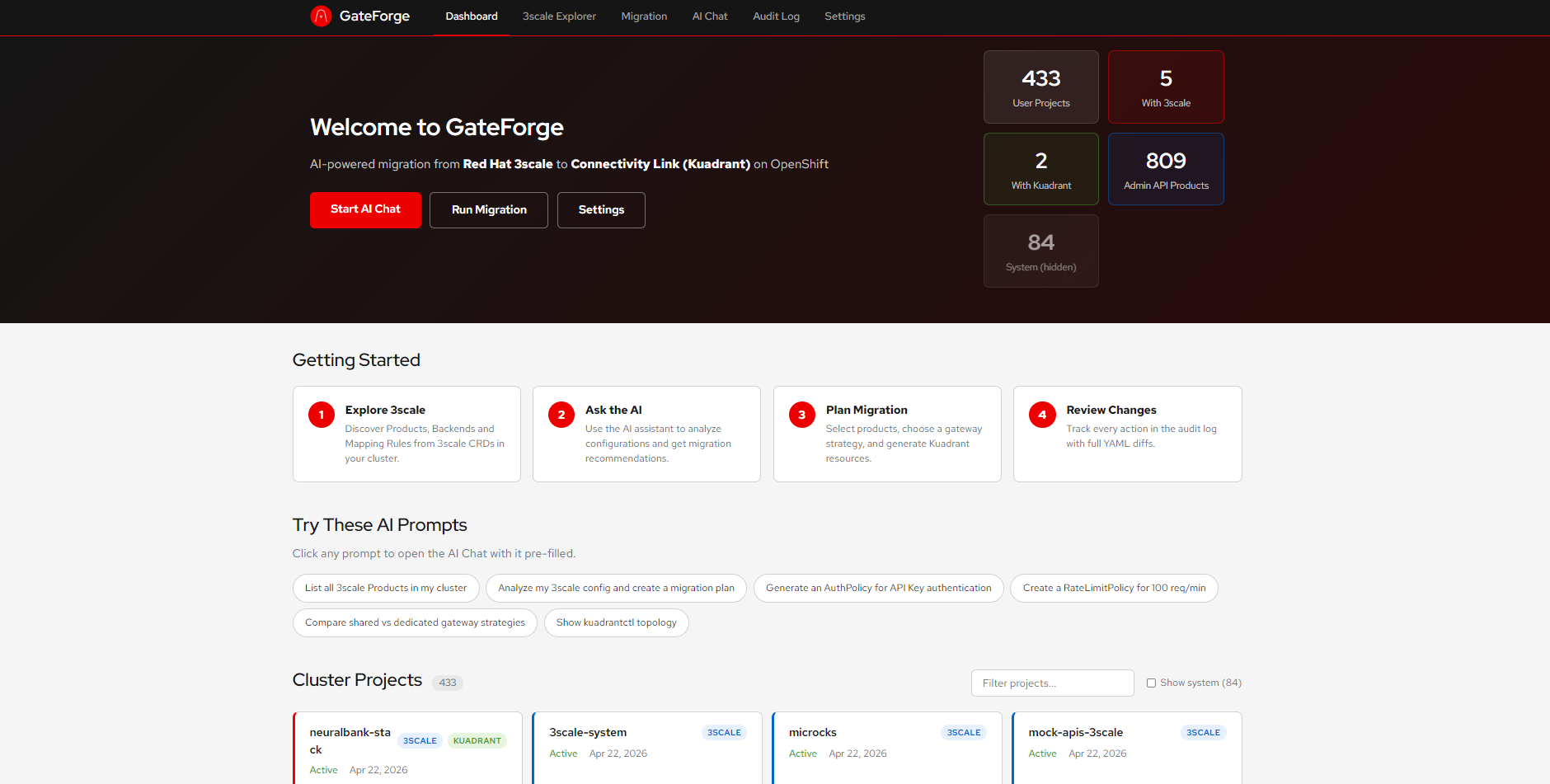 Click to enlarge
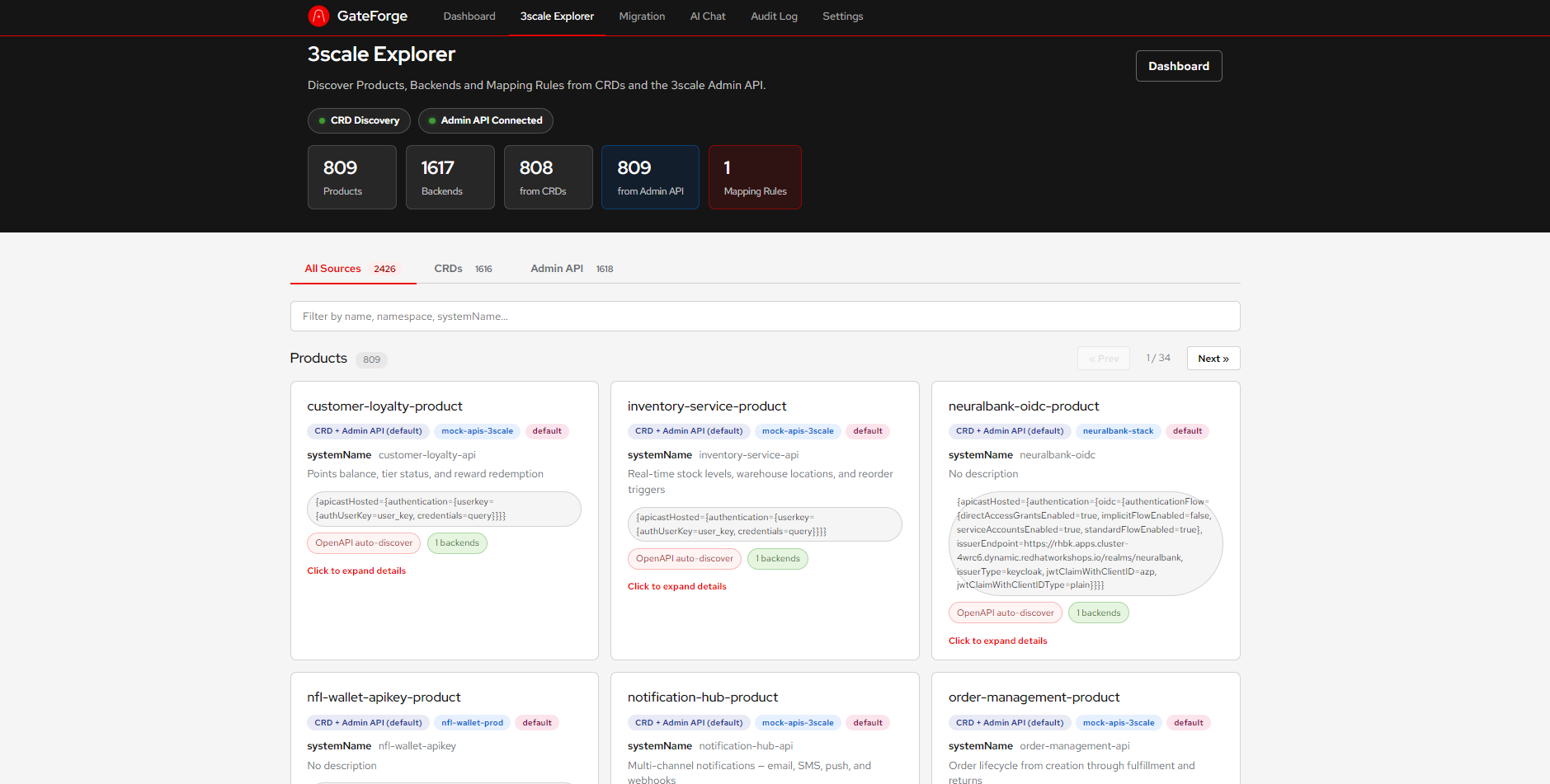 Click to enlarge
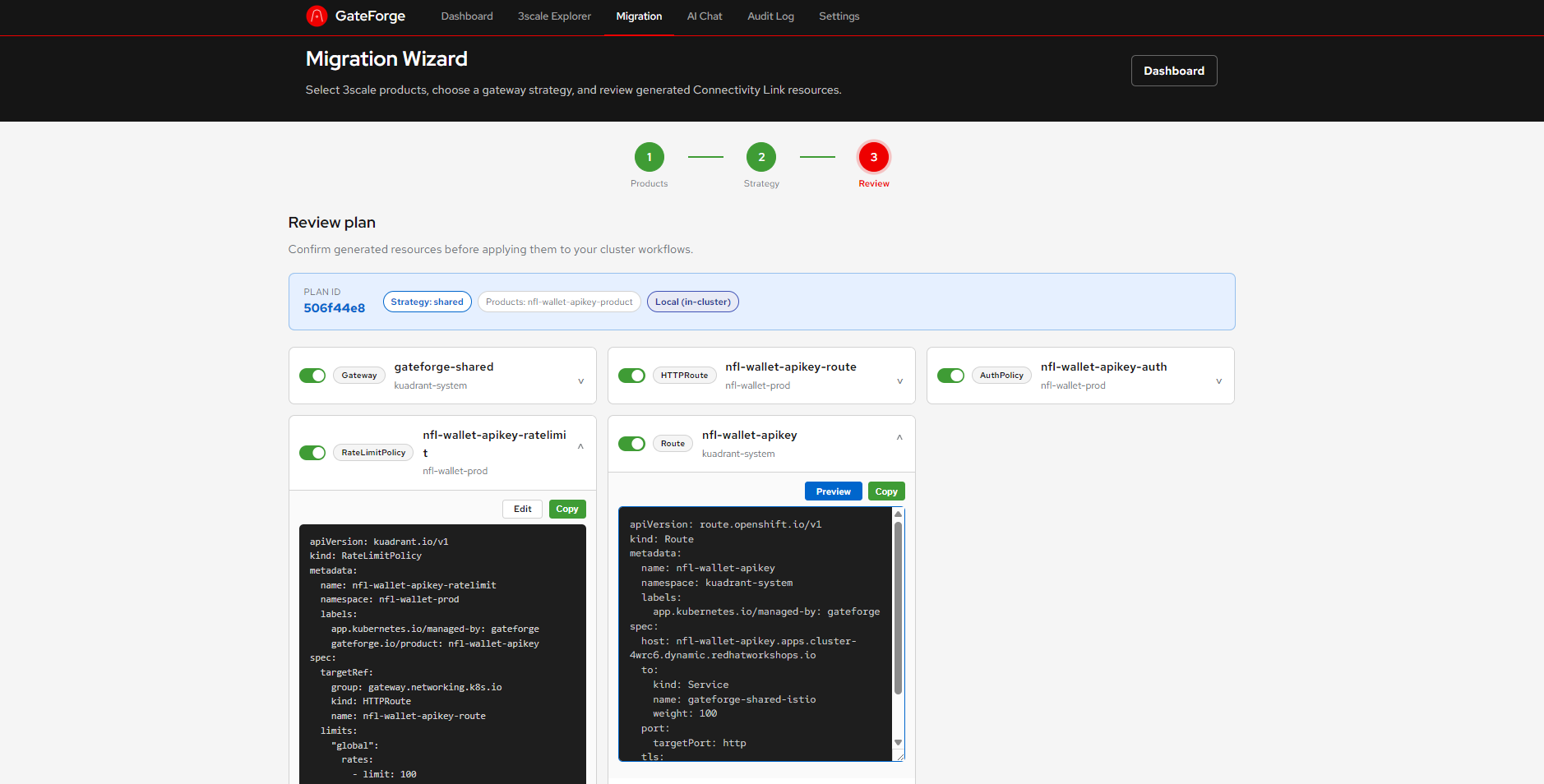 Click to enlarge
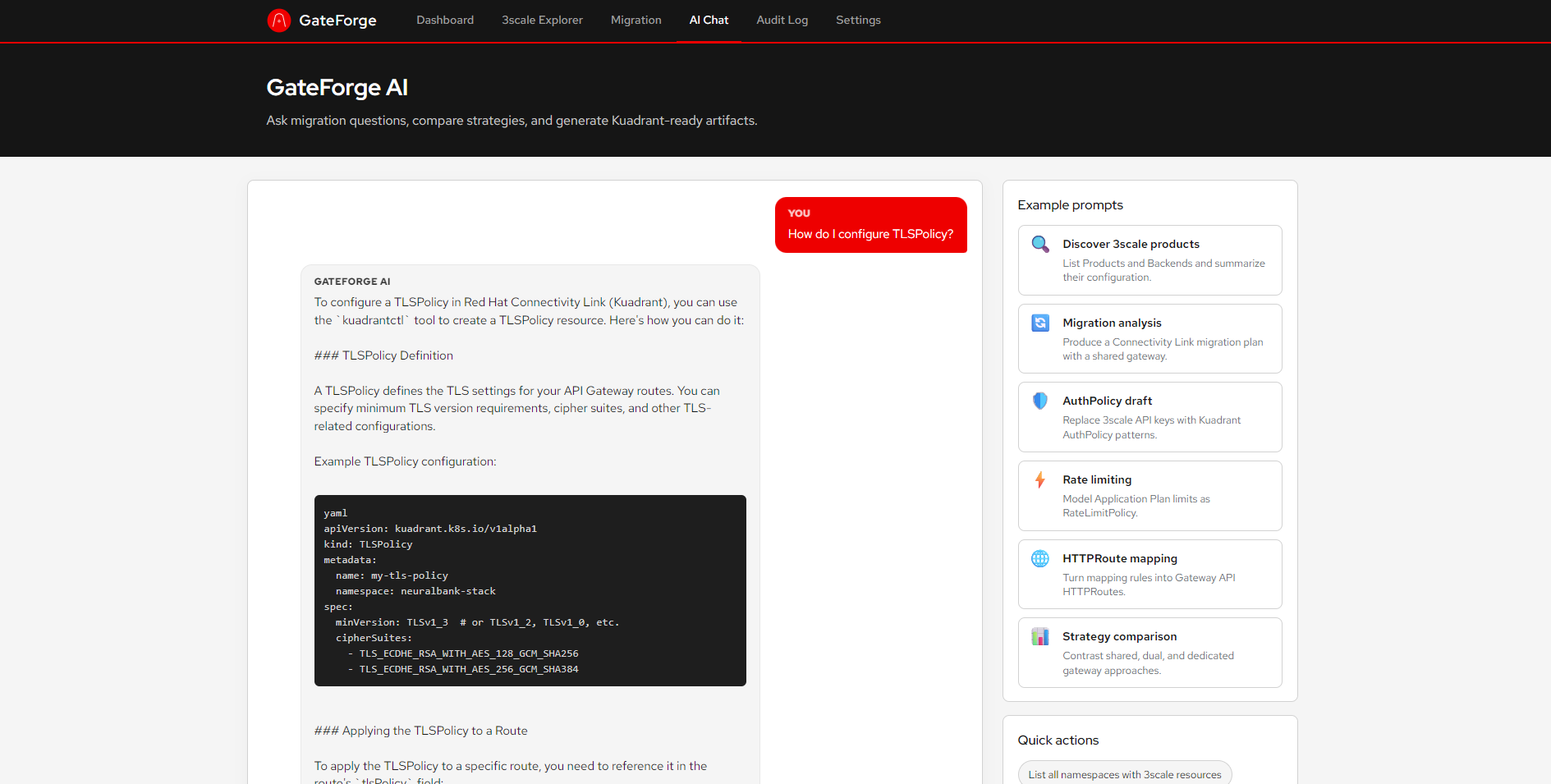 Click to enlarge
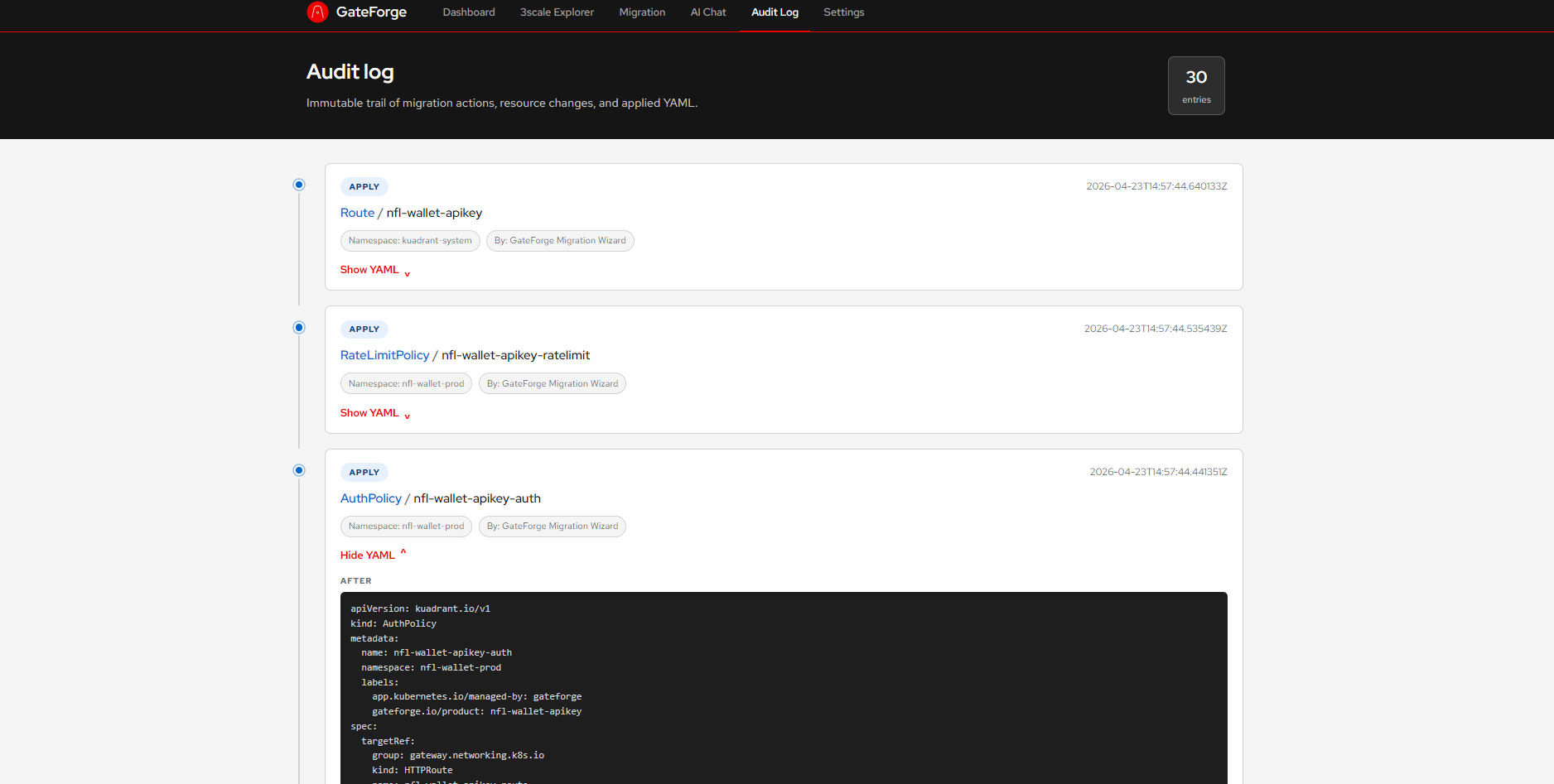 Click to enlarge
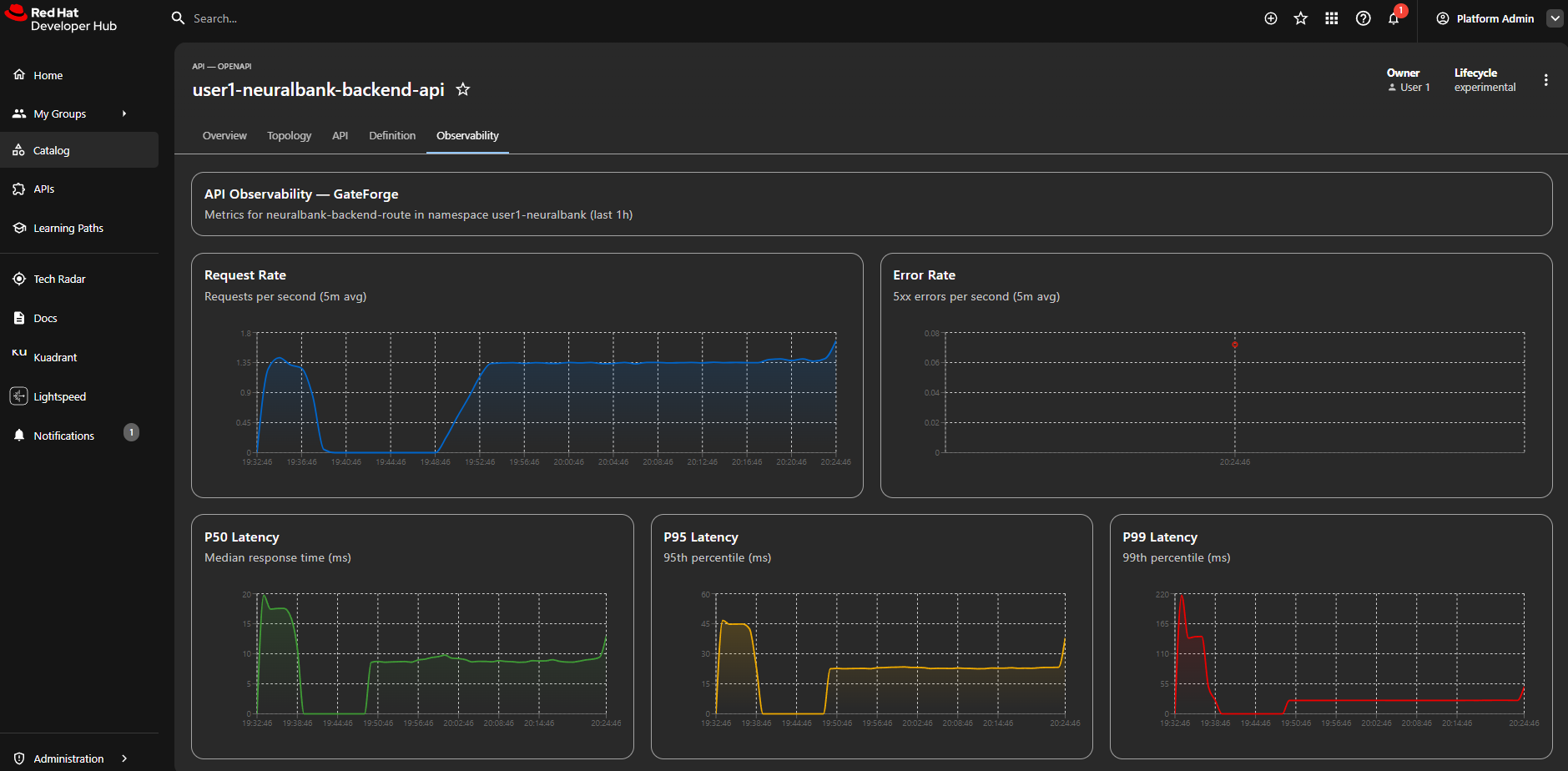 Click to enlarge
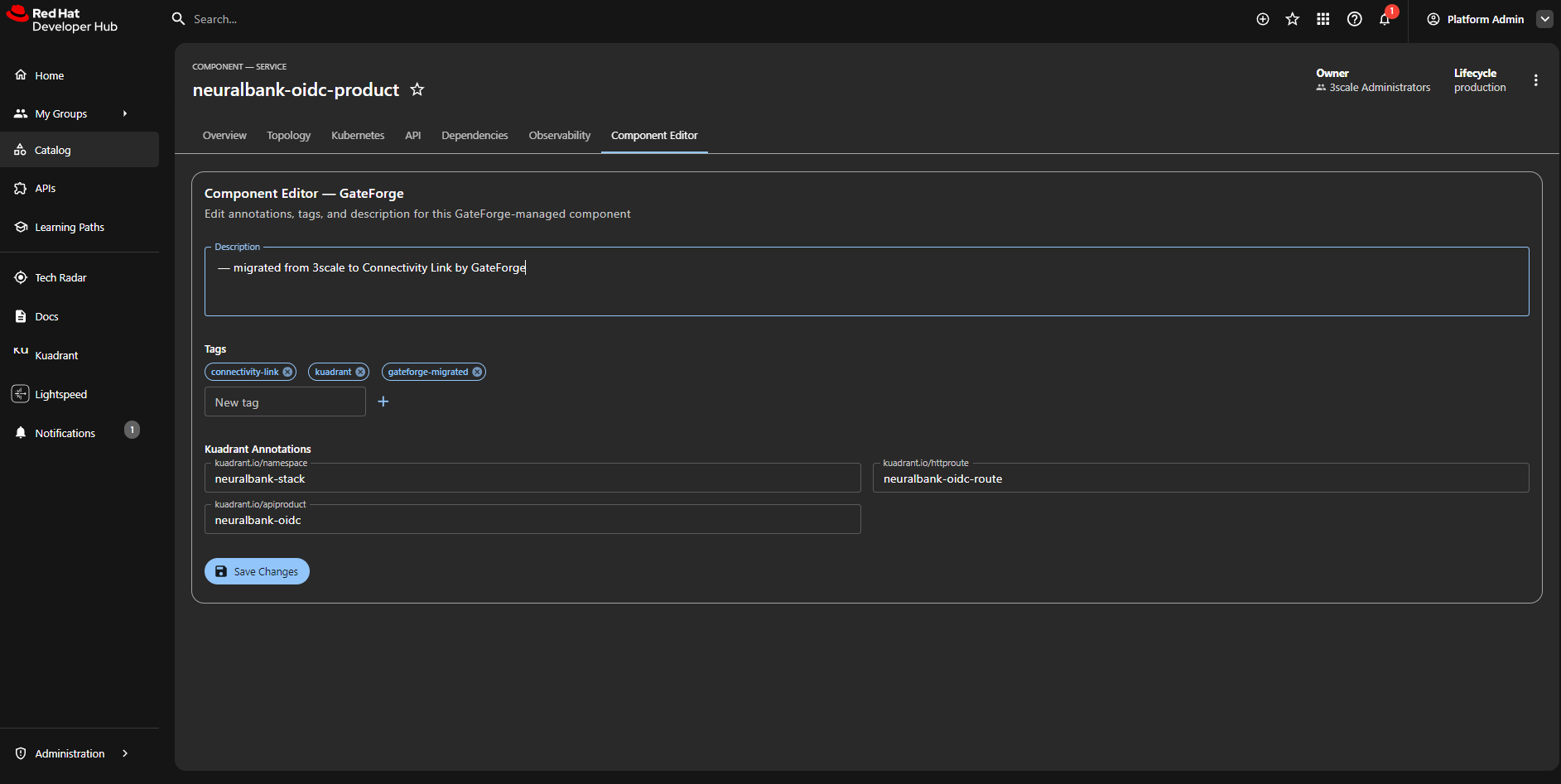 Click to enlarge
graph TB
  subgraph OCP["OpenShift Container Platform 4.20+"]
    direction TB

    subgraph gf["GateForge Platform"]
      FE["Frontend\nAngular 18 + Red Hat Design System"]
      BE["Backend\nQuarkus 3.x / Java 17"]
      PG[("PostgreSQL 15\n+ Flyway Migrations")]
      DG["Red Hat Data Grid\nInfinispan 15.x\nHot Rod Protocol"]
      DHPLUGIN["GateForge DevHub Plugin\nBackend + Frontend"]
    end

    subgraph aieng["AI Engine"]
      LC4J["LangChain4j\nMCP Tool Calling"]
      LITELLM["LiteLLM Gateway\nDeepSeek R1 14B"]
    end

    subgraph source["Red Hat 3scale API Management 2.16"]
      ADM["Admin API\nProducts - Backends - Plans - Credentials"]
      CRD3S["3scale Operator CRDs\ncapabilities.3scale.net"]
    end

    KCTL["kuadrantctl 0.10\nOpenAPI-to-Gateway API"]

    subgraph target["Red Hat Connectivity Link 1.3 / Kuadrant"]
      subgraph gwapi["Gateway API v1.2"]
        GW["Gateway\nIstio class"]
        HR["HTTPRoute\nmax 16 rules"]
      end
      subgraph kpol["Kuadrant Policies"]
        AP["AuthPolicy"]
        RLP["RateLimitPolicy"]
      end
      subgraph cl13["Connectivity Link 1.3 CRDs"]
        APROD["APIProduct\ndevportal.kuadrant.io"]
        PP["PlanPolicy\nextensions.kuadrant.io"]
        AK["APIKey\ndevportal.kuadrant.io"]
        TP["TelemetryPolicy\nextensions.kuadrant.io"]
      end
    end

    subgraph platform["Platform Services"]
      IST["Istio / Service Mesh 3.x\nSail Operator"]
      RHBK["Red Hat Build of Keycloak\nRHBK 26.4.x"]
      RHDH["Red Hat Developer Hub 1.9\n+ 3scale Auto-Discovery Plugin"]
      ARGO["ArgoCD\nCluster Discovery + GitOps"]
      MCK["Microcks 1.10\nAPI Mocking"]
    end

    subgraph obs["Observability - Optional"]
      OTEL["OpenTelemetry\nOperator + Collector"]
      PROM["Prometheus\nServiceMonitor"]
      GRAF["Grafana\nDashboard"]
      THANOS["Thanos Querier"]
    end
  end

  HELM["Helm Chart\nArtifact Hub"]

  FE -->|REST API| BE
  BE --> PG
  BE -->|FAQ + Products cache| DG
  BE --> LC4J
  LC4J --> LITELLM
  BE -->|discover products| ADM
  BE -->|Fabric8 Client| CRD3S
  BE -->|OpenAPI spec| KCTL
  KCTL -.->|generate| HR
  KCTL -.->|generate| AP
  KCTL -.->|generate| RLP
  BE ==>|apply CRDs| GW
  BE ==>|apply CRDs| HR
  BE ==>|apply CRDs| AP
  BE ==>|apply CRDs| RLP
  BE ==>|apply CRDs| APROD
  BE ==>|apply CRDs| PP
  BE ==>|apply CRDs| AK
  BE ==>|apply CRDs| TP
  IST --> GW
  AP -.->|auth delegation| RHBK
  BE -->|Scaffolder API| RHDH
  DHPLUGIN -->|Observability + Topology tabs| RHDH
  DHPLUGIN -->|proxy metrics| THANOS
  ARGO -->|cluster secrets| BE
  MCK -.->|mock backends| HR
  BE -.->|Micrometer metrics| OTEL
  OTEL --> PROM
  PROM --> GRAF
  HELM -.->|deploy| gf

  style gf fill:#fce4ec,stroke:#c62828,stroke-width:2px
  style target fill:#e8f5e9,stroke:#2e7d32,stroke-width:2px
  style source fill:#fff3e0,stroke:#e65100,stroke-width:2px
  style aieng fill:#e3f2fd,stroke:#1565c0,stroke-width:2px
  style platform fill:#f3e5f5,stroke:#6a1b9a,stroke-width:1px
  style obs fill:#fafafa,stroke:#9e9e9e,stroke-width:1px,stroke-dasharray: 5 5
  style cl13 fill:#c8e6c9,stroke:#388e3c,stroke-width:1px
  style gwapi fill:#dcedc8,stroke:#558b2f,stroke-width:1px
  style kpol fill:#dcedc8,stroke:#558b2f,stroke-width:1px
  style OCP fill:#fafafa,stroke:#212121,stroke-width:3px
flowchart TD
  Analyze["POST /api/migration/analyze"] --> FetchOAS{"Fetch OpenAPI\nfrom backend?"}
  FetchOAS -->|Found| KuadrantCtl["kuadrantctl generate\nhttproute / authpolicy / ratelimitpolicy"]
  FetchOAS -->|Not found| BuildOAS["Build synthetic OpenAPI\nfrom 3scale mapping rules"]
  BuildOAS --> KuadrantCtl
  KuadrantCtl -->|Success| PostProcess["Post-process: namespace,\ngateway, labels"]
  KuadrantCtl -->|Fail| Fallback["Fallback:\nimproved Java templates"]
  PostProcess --> Consolidate{"Rules > 16?"}
  Consolidate -->|Yes| Merge["Consolidate to\nPathPrefix matches"]
  Consolidate -->|No| AIVerify
  Merge --> AIVerify["MigrationAgent:\nverify & recommend"]
  Fallback --> AIVerify
  AIVerify --> Plan["Store plan + AI analysis"]
  Plan --> DB["Persist to PostgreSQL"]
  Plan --> SELECT["Select Target Cluster"]
  SELECT --> APPLY["Apply to Target\n(editable YAML)"]
  APPLY --> AUDIT["Record in Audit Log"]
sequenceDiagram
  participant ThreeScale as 3scale Admin API
  participant Plugin3s as RHDH 3scale Plugin
  participant Catalog as RHDH Catalog
  participant GateForge as GateForge Backend
  participant Scaffolder as RHDH Scaffolder
  participant K8s as OpenShift Cluster
  participant PluginGF as GateForge Frontend Plugin
  participant THANOS as Thanos Querier

  Plugin3s->>ThreeScale: Poll products (every 5 min)
  ThreeScale-->>Plugin3s: Product list
  Plugin3s->>Catalog: Create/update API entities

  GateForge->>K8s: Apply Kuadrant resources
  GateForge->>GateForge: Generate Component catalog-info.yaml
  GateForge->>Scaffolder: POST /api/scaffolder/v2/tasks (gateforge-register-component)
  Scaffolder->>Catalog: catalog:register (from GateForge URL)
  Note over GateForge,Scaffolder: On timeout → error to user

  PluginGF->>K8s: Fetch policies (AuthPolicy, RateLimitPolicy, etc.)
  PluginGF->>PluginGF: Render Policy Topology tab
  PluginGF->>THANOS: Proxy metrics query
  PluginGF->>PluginGF: Render Observability tab
flowchart LR
  Product["3scale Product"] --> Gateway["Gateway"]
  Product --> HTTPRoute["HTTPRoute"]
  Product --> AuthPolicy["AuthPolicy"]
  Product --> RateLimit["RateLimitPolicy"]
  Product --> APIProduct["APIProduct\n(devportal.kuadrant.io)"]
  Product --> Route["OpenShift Route"]

  Plans["Application Plans"] --> PlanPolicy["PlanPolicy\n(extensions.kuadrant.io)"]
  Keys["Application Keys"] --> APIKey["Secret\n(api_key from 3scale user_key)"]

  Observability{"Observability\nenabled?"} -->|Yes| TelemetryPolicy["TelemetryPolicy\n(extensions.kuadrant.io)"]
  Observability -->|No| Skip["Skipped"]

  style APIProduct fill:#e6f5e0,stroke:#2d6b24
  style PlanPolicy fill:#e0ecff,stroke:#0066cc
  style APIKey fill:#e0ecff,stroke:#0066cc
  style TelemetryPolicy fill:#fff3e0,stroke:#e65100
  style Skip fill:#f5f5f5,stroke:#999
flowchart LR
  User[User Question] --> Normalize[Normalize text]
  Normalize --> CacheCheck{FAQ Cache Hit?}
  CacheCheck -->|Yes| Instant["Return cached response (ms)"]
  CacheCheck -->|No| LLM["Call LLM (30-60s)"]
  LLM --> Response[Return AI response]
  Startup[App Startup] --> WarmUp["Background: send FAQ prompts to LLM"]
  WarmUp --> DataGrid["Store in Data Grid (gateforge-faq)"]
sequenceDiagram
  participant U as User
  participant Chat as ChatComponent
  participant Agent as MigrationAgent
  participant LLM as LiteLLM (deepseek-r1)
  participant Tools as GateForgeTools
  participant Svc as Backend Services

  U->>Chat: Ask question
  Chat->>Agent: POST /api/chat
  Agent->>LLM: Chat completion + tool definitions
  LLM-->>Agent: tool_call: listThreeScaleProducts()
  Agent->>Tools: invoke listThreeScaleProducts
  Tools->>Svc: ThreeScaleService.listProducts()
  Svc-->>Tools: Product list (all sources)
  Tools-->>Agent: Formatted product data
  Agent->>LLM: Tool result + continue
  LLM-->>Agent: Final answer with real data
  Agent-->>Chat: Response
  Chat-->>U: Display answer
The original GateForge capability — and still its core — is translating Red Hat 3scale API Management configuration into Connectivity Link 1.3 (Kuadrant) resources. Analysis always produces the full resource set; cluster readiness is validated separately before apply.
POST /api/migration/analyze never skips resources due to missing operators.
The Migration Wizard shows Required for apply, not for analysis prerequisites; use
GET /api/cluster/readiness?planId=… to probe the target cluster.
Machine-readable catalog: GET /api/migration/policy-mapping.
Do not mix these layers when suggesting migration resources:
| Layer | API group | Resources |
|---|---|---|
| Gateway API | gateway.networking.k8s.io/v1 | Gateway, HTTPRoute |
| Core RHCL | kuadrant.io/v1 | AuthPolicy, RateLimitPolicy, TokenRateLimitPolicy, DNSPolicy, TLSPolicy |
| Extensions | extensions.kuadrant.io/v1alpha1 | PlanPolicy, OIDCPolicy, TelemetryPolicy |
| Developer Portal | devportal.kuadrant.io/v1alpha1 | APIProduct, APIKey |
| Platform | v1, route.openshift.io/v1 | Secret, Route, Service, ServiceEntry |
OIDCPolicy ≠ AuthPolicy JWT. OIDCPolicy orchestrates OAuth Authorization Code (browser) flows. Bearer JWT uses AuthPolicy.jwt.issuerUrl. Token introspection uses AuthPolicy.oauth2Introspection.
| 3scale | RHCL 1.3 | GateForge | Notes |
|---|---|---|---|
| Product / exposure | Gateway + HTTPRoute + Route | Generated | shared / dual / dedicated strategies |
| Backend / mapping rules | HTTPRoute.rules + backendRefs | Generated | PathPrefix; max 16 rules consolidated |
| Application (API Key) | Secret + AuthPolicy.apiKey | Generated | user_key preserved |
| Application (OIDC) | AuthPolicy.jwt | Generated | No consumer Secrets |
| Application Plan + limits | PlanPolicy | Generated | Primary tier/limits vehicle |
| Global / edge limit | RateLimitPolicy | Partial | 100 req/60s placeholder baseline |
| Token-based limit (LLM) | TokenRateLimitPolicy | Suggested | Token-metered APIs |
| TLS termination | TLSPolicy | Suggested | cert-manager / ACME |
| DNS / multicluster | DNSPolicy | Suggested | Multicluster exposure |
| Custom metrics labels | TelemetryPolicy | Generated | When observability enabled |
| OAuth browser flow | OIDCPolicy | Suggested | Not a JWT substitute |
| API catalog | APIProduct | Generated | Optional Developer Portal tier |
| Custom Lua policies | EnvoyFilter / WASM | Manual | No automatic migration |
| Header / URL rewrite | HTTPRoute filters | Suggested | Gateway API filters |
| APIcast policy | RHCL 1.3 | GateForge |
|---|---|---|
| API Key | AuthPolicy apiKey + Secret | Generated |
| OIDC (Bearer JWT) | AuthPolicy jwt.issuerUrl | Generated |
| JWT Claim Check | AuthPolicy authorization | Suggested |
| OAuth 2.0 Token Introspection | AuthPolicy oauth2Introspection | Suggested |
| Keycloak Role Check | AuthPolicy authorization on JWT claims | Suggested |
| OAuth Auth Code (browser) | OIDCPolicy | Suggested |
| mTLS / TLS Client Cert | TLSPolicy + AuthPolicy x509 | Suggested |
| Edge Limiting | RateLimitPolicy + PlanPolicy | Partial |
| Custom Metrics | TelemetryPolicy + Envoy metrics | Partial |
| WASM Plug-In | Envoy WASM / Extension SDK | Manual |
| Auth Caching / Batcher / Referrer | N/A | 3scale-specific |
| CORS, Retry, SOAP, Caching | HTTPRoute filters / Istio / WASM | Manual |
| 3scale Object | Connectivity Link Resource | Implementation notes |
|---|---|---|
| Product | Gateway + HTTPRoute + AuthPolicy + RateLimitPolicy + APIProduct + Route | One resource bundle per selected product; labeled gateforge.io/product |
| Backend | HTTPRoute backendRefs | Single-backend or multi-backend PathPrefix rules per usage path |
| Mapping Rules | HTTPRoute rules | Regex $ anchor removed; {id} params normalized; max 16 rules → prefix consolidation |
| Application Plans | PlanPolicy + RateLimitPolicy | Plan limits → daily/monthly/custom windows; global 100 req/60s baseline on HTTPRoute |
| Application Keys | Secret per app | user_key preserved as stringData.api_key; tier via secret.kuadrant.io/plan-id |
| OIDC apps | AuthPolicy JWT + PlanPolicy | No Secrets; tiers match JWT clientID to 3scale application_id |
| Proxy auth | AuthPolicy | API Key and OIDC are mutually exclusive per API (detected from proxy metadata) |
| External access | OpenShift Route | Edge TLS termination → Istio Gateway service |
| Metrics | TelemetryPolicy (optional) | Labels: product, auth_type, plan, user |
| Strategy | Gateway resources |
|---|---|
shared (default) | Single gateforge-shared Gateway for all products |
dual | Separate internal and external Gateways |
dedicated | One Gateway per product ({systemName}-gw) |
/q/openapi, /openapi.json, /swagger.json, etc.PathPrefix segments.3scale regex patterns become Gateway API PathPrefix matches (not exact regex):
AuthPolicy selects Secrets labeled app: <productSystemName> (Authorino-managed).user_key becomes a dedicated Secret preserving the original key.PlanPolicy tiers use predicates on secret.kuadrant.io/plan-id.AuthPolicy uses jwt.issuerUrl from 3scale oidc_issuer_endpoint (embedded credentials stripped).Authorization: Bearer.PlanPolicy tiers match auth.identity.metadata.annotations["clientID"] to 3scale application_id.3scale application plan periods map to PlanPolicy limit fields:
| 3scale period | PlanPolicy field |
|---|---|
minute | custom window 1m |
hour | custom window 1h |
day | daily |
week | weekly |
month | monthly |
year / eternity | yearly |
A global RateLimitPolicy (100 requests / 60s) is attached to each HTTPRoute as a baseline guardrail.
Resources are applied in dependency order:
Prerequisites inferred from generated resources:
| Prerequisite | CRD probe | Triggered by |
|---|---|---|
| Gateway API | gateways.gateway.networking.k8s.io | Gateway, HTTPRoute |
| RHCL / Kuadrant core | authpolicies.kuadrant.io | AuthPolicy, RateLimitPolicy |
| Kuadrant extensions | planpolicies.extensions.kuadrant.io | PlanPolicy, TelemetryPolicy |
| Developer Portal | apiproducts.devportal.kuadrant.io | APIProduct |
| OpenShift Routes | routes.route.openshift.io | Route |
| Authorino secrets | — | Secret with api_key |
| Endpoint | Method | Description |
|---|---|---|
/api/cluster/projects | GET | List all cluster projects |
/api/threescale/products | GET | List 3scale Products (all sources) |
/api/threescale/backends | GET | List 3scale Backends (all sources) |
/api/threescale/status | GET | Admin API connectivity status |
/api/threescale/refresh | POST | Evict discovery cache and reload products/backends from 3scale |
/api/migration/policy-mapping | GET | Consolidated 3scale → RHCL 1.3 mapping catalog (taxonomy, consolidated table, APIcast policies) |
/api/migration/analyze | POST | Analyze and plan migration; returns prerequisites[] for apply-time readiness |
/api/migration/plans/{id}/apply | POST | Apply plan to target cluster |
/api/migration/plans/{id}/revert | POST | Revert plan from target cluster |
/api/migration/revert-bulk | POST | Bulk revert to 3scale |
/api/audit/reports | GET | View audit log |
/api/chat | POST | AI migration assistant (with FAQ cache) |
/api/chat/warm-faq | POST | Trigger FAQ cache refresh |
/api/chat/faq-status | GET | Check FAQ cache status (cached/total) |
| Endpoint | Method | Description |
|---|---|---|
/api/threescale/sources | GET | List all 3scale sources |
/api/threescale/sources | POST | Add a new 3scale source |
/api/threescale/sources/{id} | DELETE | Remove a source |
/api/threescale/sources/{id}/status | GET | Check source connectivity |
| Endpoint | Method | Description |
|---|---|---|
/api/cluster/targets | GET | List target clusters |
/api/cluster/targets | POST | Add a target cluster |
/api/cluster/targets/{id} | DELETE | Remove a target cluster |
/api/cluster/targets/{id}/validate | GET | Validate RBAC access on target |
/api/cluster/readiness | GET | Probe cluster RHCL readiness; optional planId and targetClusterId |
| Endpoint | Method | Description |
|---|---|---|
/api/hub/overview | GET | Aggregated hub stats |
/api/hub/audit?cluster=X&action=Y | GET | Federated audit log with filtering |
/api/hub/plans?cluster=X&status=Y | GET | Federated plans with filtering |
/api/hub/topology | GET | Cluster + source topology graph |
| Endpoint | Method | Description |
|---|---|---|
/api/apicast/discover | GET | Discover all APIManagers with self-managed APICast |
/api/apicast/discover/{namespace} | GET | Discover APIManagers by namespace |
/api/apicast/analyze/{namespace}/{name} | GET | Analyze specific APIManager configuration |
/api/apicast/map | POST | Map APICast config to Istio resources |
/api/apicast/map-all | POST | Batch map all discovered APICasts |
| Endpoint | Method | Description |
|---|---|---|
/api/migration/plans/{id}/catalog-info/{product} | GET | Serve generated catalog-info.yaml for catalog:register |
/api/migration/plans/{id}/confirm-registration | POST | Confirm Component registration (with optional edits) |
graph LR
    Discover["1. Discover APIs"] --> Analyze["2. AI Analysis"]
    Analyze --> Review["3. Review & Apply"]
    Review --> Verify["4. Verify in DevHub"]

    style Discover fill:#e0ecff,stroke:#0066cc,stroke-width:2px
    style Analyze fill:#fce4ec,stroke:#880e4f,stroke-width:2px
    style Review fill:#e6f5e0,stroke:#2d6b24,stroke-width:2px
    style Verify fill:#fff3e0,stroke:#e65100,stroke-width:2px
Watch the 3-minute demo
Coming SoonVideo walkthrough of the full migration workflow will be available here.
Install GateForge on OpenShift with PostgreSQL persistence.
Connect to multiple 3scale Admin API instances.
Deploy to multiple OpenShift clusters or auto-discover via ArgoCD.
GateForge includes an AI-powered chat assistant. Here are some example prompts:
| Strategy | Description | Best For |
|---|---|---|
shared | Single Istio Gateway with multiple HTTPRoutes | Small to medium clusters |
dual | Two Gateways (internal/external) split by exposure | Network segmentation |
dedicated | One Gateway per Product, full isolation | Strict isolation requirements |
| Value | Default | Description |
|---|---|---|
backend.image.tag | v0.1.9 | Backend image tag |
frontend.image.tag | v0.1.9 | Frontend image tag |
ai.endpoint | litellm-prod... | LLM endpoint URL |
ai.model | deepseek-r1-distill-qwen-14b | AI model name |
ai.apiKey | "" | LLM API key |
threescale.adminApi.url | "" | 3scale Admin Portal URL |
threescale.adminApi.accessToken | "" | 3scale access token |
threescale.sources | "" | JSON array of additional 3scale sources |
targetClusters | "" | JSON array of target clusters |
argocd.clusterDiscovery | false | Auto-discover clusters from ArgoCD |
postgresql.enabled | true | Deploy PostgreSQL |
postgresql.username | gateforge | DB username |
postgresql.password | gateforge | DB password |
connectivityLink.gatewayStrategy | shared | shared / dual / dedicated |
connectivityLink.gatewayClassName | istio | Gateway class |
rbac.clusterAdmin | false | Use cluster-admin vs least-privilege |
route.enabled | true | Create OpenShift Route |
developerHub.enabled | false | Enable Developer Hub catalog-info generation |
developerHub.url | "" | Developer Hub URL for component registration |
developerHub.scaffolderUrl | "" | RHDH Scaffolder API URL for Component registration |
developerHub.scaffolderToken | "" | Bearer token for Scaffolder API authentication |
developerHub.componentSuffix | -product | Suffix appended to the product name to form the Component entity name (e.g. nfl-wallet-apikey-product) |
datagrid.enabled | true | Deploy Data Grid for caching |
datagrid.cacheTtlSeconds | 3600 | Cache TTL for 3scale products/backends |
observability.enabled | false | Enable OpenTelemetry + metrics export |
observability.serviceMonitor.enabled | false | Deploy Prometheus ServiceMonitor |
observability.grafanaDashboard.enabled | false | Deploy Grafana dashboard ConfigMap |
GateForge integrates with Red Hat Developer Hub (RHDH) 1.9+ through two OCI-packaged dynamic plugins and standard Software Templates. This section explains how to configure every piece.
After a successful migration, the GateForge backend triggers a Software Template (gateforge-register-component) via the RHDH Scaffolder API. The Scaffolder fetches the generated catalog-info.yaml from the GateForge backend and registers a Component entity in the catalog. Two dynamic plugins add frontend tabs (Observability, Policy Topology, Component Editor) and a backend processor for annotation-based entity enrichment.
Set these values in your GateForge Helm chart deployment:
| Value | Description |
|---|---|
developerHub.scaffolderUrl | Full URL to the Scaffolder task creation endpoint. Must match the RHDH external Route. |
developerHub.scaffolderToken | The BACKEND_SECRET value from the RHDH deployment. Used as Bearer token for Scaffolder API auth. |
developerHub.componentSuffix | Suffix added to the 3scale product name when creating Component entities (default: -product). |
app-config-rhdh ConfigMapAdd the GateForge frontend Route to backend.reading.allow so the Scaffolder can fetch catalog-info.yaml:
Register the Software Templates catalog in catalog.locations:
dynamic-plugins-rhdh)Add both GateForge plugins to the dynamic-plugins-rhdh ConfigMap:
Ensure users have the following permissions in rbac-policy-rhdh:
Two templates are included in the GateForge repository:
| Template | Purpose | Trigger |
|---|---|---|
gateforge-register-component | Registers a Component in the catalog using catalog:register action. Fetches catalog-info.yaml from the GateForge backend. | Automatic (backend calls Scaffolder API after migration apply) |
gateforge-unregister-component | Removes a Component from the catalog using catalog:unregister action. | Automatic (backend calls Scaffolder API on plan revert) |
sequenceDiagram
  participant User as Platform Admin
  participant FE as GateForge Frontend
  participant BE as GateForge Backend
  participant SCF as RHDH Scaffolder
  participant CAT as RHDH Catalog
  participant K8s as OpenShift

  User->>FE: Click "Apply Migration"
  FE->>BE: POST /api/migration/plans/{id}/apply
  BE->>K8s: Apply Kuadrant resources
  BE-->>FE: Resources applied (editable Component YAML)
  User->>FE: Review/edit Component YAML
  User->>FE: Click "Register in Developer Hub"
  FE->>BE: POST /api/migration/plans/{id}/confirm-registration
  BE->>SCF: POST /api/scaffolder/v2/tasks (gateforge-register-component)
  SCF->>BE: GET /api/migration/plans/{id}/catalog-info/{product}
  BE-->>SCF: catalog-info.yaml (Component definition)
  SCF->>CAT: catalog:register
  CAT-->>SCF: entityRef
  SCF-->>BE: 201 Created (task ID)
  BE-->>FE: {status: "registered"}
GateForge can be deployed through ArgoCD using the Helm chart from the GitHub Pages repository. Two deployment topologies are supported.
The simplest setup: GateForge and all target resources run on the same OpenShift cluster. Create a single ArgoCD Application pointing at the Helm chart.
In a hub-spoke topology, GateForge runs on the hub cluster and migrates APIs to one or more spoke clusters. The hub holds the PostgreSQL database, Data Grid cache, and serves the UI. Spoke clusters only need Connectivity Link (Kuadrant) installed.
flowchart TB
  subgraph HubCluster["Hub Cluster (OpenShift)"]
    ARGO["ArgoCD\n(openshift-gitops)"]
    GF["GateForge\n(Helm chart)"]
    RHDH["Developer Hub\n(dynamic plugins)"]
    PG[("PostgreSQL")]
  end

  subgraph SpokeA["Spoke Cluster A"]
    CLA["Connectivity Link\n(Kuadrant)"]
    GWA["Gateway + HTTPRoute\nAuthPolicy + RateLimitPolicy"]
  end

  subgraph SpokeB["Spoke Cluster B"]
    CLB["Connectivity Link\n(Kuadrant)"]
    GWB["Gateway + HTTPRoute\nAuthPolicy + RateLimitPolicy"]
  end

  ARGO -->|deploy chart| GF
  GF --> PG
  GF -->|apply resources| CLA
  GF -->|apply resources| CLB
  GF -->|Scaffolder API| RHDH
  ARGO -.->|cluster secrets\nauto-discovery| GF

  style HubCluster fill:#fce4ec,stroke:#c62828,stroke-width:2px
  style SpokeA fill:#e8f5e9,stroke:#2e7d32,stroke-width:1px
  style SpokeB fill:#e8f5e9,stroke:#2e7d32,stroke-width:1px
ignoreDifferences for fields managed by OpenShift (e.g. Route status, Service cluster IPs).argocd.argoproj.io/refresh=hard.argocd.clusterDiscovery: true, GateForge reads cluster secrets from the openshift-gitops namespace. The ServiceAccount needs get/list on Secrets in that namespace.Deploy GateForge on OpenShift or run it locally for development. Ensure prerequisites are satisfied before installing the Helm chart.
From the repository root, build and start local dependencies and services:
GET /q/health on the GateForge backend route or Service portSingle-tenant mode uses one 3scale Admin API source and one target OpenShift cluster. This is the simplest production layout.
| Value | Role |
|---|---|
threescale.adminApi.url | Base URL of the 3scale Admin Portal / Admin API |
threescale.adminApi.accessToken | Personal access token for the Admin API |
clusterDomain | Apps domain for the target cluster (for routes and defaults) |
connectivityLink.targetNamespace | Namespace where Kuadrant / Gateway API resources are applied |
connectivityLink.gatewayStrategy | shared (recommended for most), dual, or dedicated |
Enable catalog registration and Scaffolder-driven workflows with developerHub.enabled: true and set developerHub.scaffolderUrl to your Red Hat Developer Hub Scaffolder API base URL (plus optional token values as documented in the chart).
values.yaml snippetMulti-tenant (hub-spoke) deployments connect GateForge to multiple 3scale sources and multiple target clusters. The hub cluster runs GateForge with PostgreSQL persistence and Data Grid; audit and plan data can be federated across spokes.
Provide threescale.sources as a JSON array of source objects (id, label, admin URL, token, enabled flags). Each entry is discovered and listed independently in the UI and APIs.
Set targetClusters to a JSON array of cluster definitions (API server URL, token, labels, TLS options). Migrations can target any registered cluster from the wizard.
With argocd.clusterDiscovery: true, GateForge discovers Argo CD cluster secrets and surfaces them as selectable targets without hard-coding kubeconfigs in values.
Keep postgresql.enabled: true on the hub for durable migration plans. Federated audit APIs aggregate events across clusters for compliance and troubleshooting.
flowchart TB
  subgraph Hub["Hub cluster"]
    GF["GateForge\n(Backend + Frontend)"]
    PG[("PostgreSQL\nplans + audit")]
    DG["Red Hat Data Grid\nFAQ + product cache"]
  end

  subgraph Sources["Multiple 3scale sources"]
    S1["3scale instance A\nAdmin API + CRDs"]
    S2["3scale instance B\nAdmin API + CRDs"]
    S3["3scale instance N\n..."]
  end

  subgraph Targets["Target clusters"]
    C1["OpenShift cluster 1\nConnectivity Link"]
    C2["OpenShift cluster 2\nConnectivity Link"]
    CN["OpenShift cluster N\n..."]
  end

  GF --> PG
  GF --> DG
  GF --> S1
  GF --> S2
  GF --> S3
  GF --> C1
  GF --> C2
  GF --> CN

  style Hub fill:#fce4ec,stroke:#c62828,stroke-width:2px
  style Sources fill:#fff3e0,stroke:#e65100,stroke-width:1px
  style Targets fill:#e8f5e9,stroke:#2e7d32,stroke-width:1px
GateForge talks to any OpenAI-compatible endpoint through LiteLLM (or a compatible proxy). The default chart model name (deepseek-r1-distill-qwen-14b) is a sensible starting point but is not mandatory—point ai.endpoint and ai.model at whatever serving stack you run.
| Property | Description |
|---|---|
ai.endpoint | Base URL for chat completions (OpenAI-compatible) |
ai.model | Model id as understood by the upstream server |
ai.apiKey | Bearer token or API key required by the endpoint |
ai.temperature | Sampling temperature for completions |
ai.maxTokens | Upper bound on generated tokens per response |
| Model | Provider | Notes |
|---|---|---|
| deepseek-r1-distill-qwen-14b | LiteLLM / vLLM | Default in chart. Strong reasoning for migration questions. |
| qwen2.5-coder-7b-instruct | vLLM / Ollama | Lighter and fast; good for interactive chat. |
| llama-3.1-8b-instruct | vLLM / Ollama | General-purpose instruct model. |
| granite-3.1-8b-instruct | IBM / RHEL AI | Aligned with Red Hat AI on RHEL OpenShift. |
| mistral-7b-instruct-v0.3 | vLLM / Ollama | Balanced quality and footprint. |
| GPT-4o, Claude, etc. | OpenAI / Anthropic | Via LiteLLM proxy; typically best quality if budget allows. |
Ollama (in-cluster Service exposing OpenAI-compatible API):
vLLM (OpenAI-compatible server fronted by a Route or Service):
The assistant uses context injection plus a single chat completion (and tool calls where enabled). It is not a RAG pipeline: there are no vector stores or embedding indexes in the request path for these answers.
flowchart LR
  A["User POST /api/chat"] --> B["Normalize input"]
  B --> C{"FAQ cache hit?\n(Data Grid)"}
  C -->|Yes| R["Return cached answer"]
  C -->|No| D["Build context:\n3scale products,\ncluster status,\nkuadrantctl version"]
  D --> E["Inject context\ninto user message"]
  E --> F["LLM chat completion\n(OpenAI-compatible)"]
  F --> G["Strip <redacted_thinking> blocks\nfrom reasoning models"]
  G --> H["Response to client"]

  style C fill:#e3f2fd,stroke:#1565c0
  style F fill:#fff3e0,stroke:#e65100
<redacted_thinking>...</redacted_thinking> blocks; these are stripped before the user sees the answer.GateForge shells out to kuadrantctl for OpenAPI-driven generation. The table below lists the commands the platform uses or relates to; the migration pipeline primarily relies on HTTPRoute generation, with policies often produced in Java.
| Command | Purpose | Input | Output |
|---|---|---|---|
kuadrantctl generate gatewayapi httproute --oas - | Generate HTTPRoute | OpenAPI YAML on stdin | HTTPRoute YAML |
kuadrantctl generate kuadrant authpolicy --oas - | Generate AuthPolicy | OpenAPI YAML on stdin | AuthPolicy YAML |
kuadrantctl generate kuadrant ratelimitpolicy --oas - | Generate RateLimitPolicy | OpenAPI YAML on stdin | RateLimitPolicy YAML |
kuadrantctl topology -n {namespace} | Show policy topology | Namespace | Topology text |
kuadrantctl version | Check CLI version | — | Version string |
flowchart TD
  OAS["OpenAPI spec\n(fetched or synthetic)"] --> KH["kuadrantctl generate\nhttproute --oas -"]
  KH -->|success| PP["Post-process:\nnamespace, gateway, labels"]
  KH -->|failure| FB["Fallback:\nJava template generation"]
  PP --> RL{"Rules > 16?\nGateway API limit"}
  RL -->|yes| CO["Consolidate\nprefix matches"]
  RL -->|no| JV["Java builds\nAuthPolicy + RateLimitPolicy"]
  CO --> JV
  FB --> JV
  JV --> AI["AI verification\nof generated plan"]

  style KH fill:#e3f2fd,stroke:#1565c0
  style JV fill:#fff3e0,stroke:#e65100
  style FB fill:#ffebee,stroke:#c62828